Automatic Drawing Ballooning
Balloon any drawing automatically: native or scanned PDF.
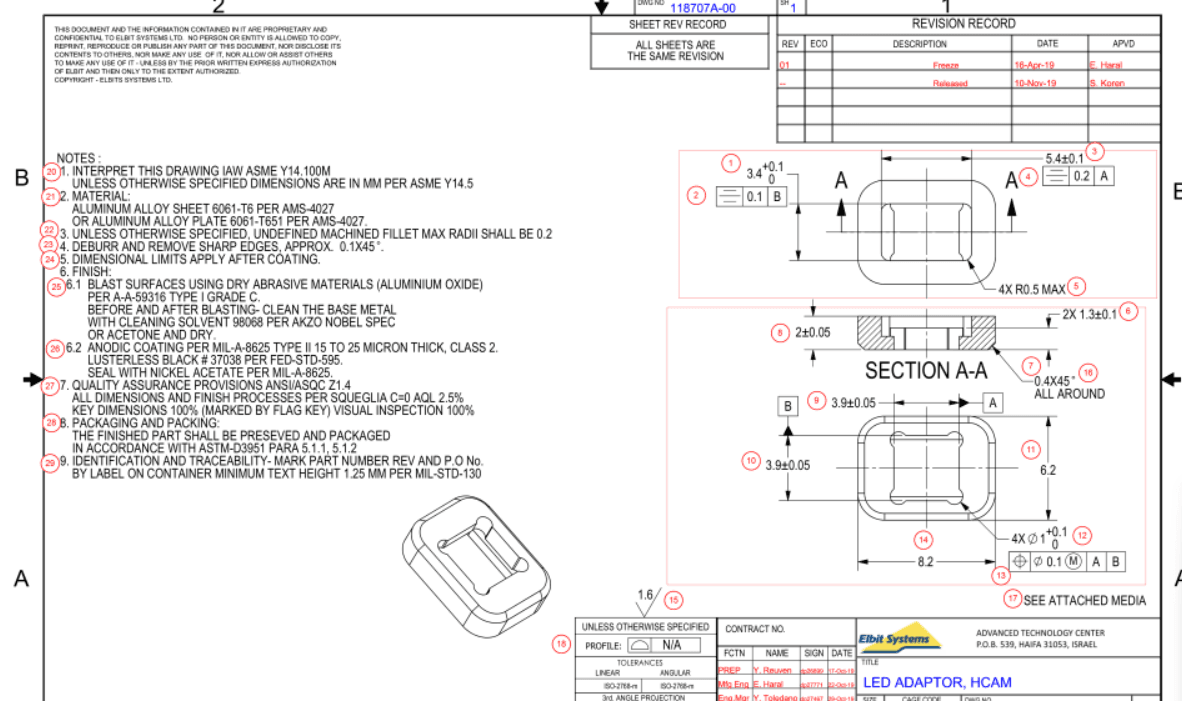
PAS PDF recognizes dimensions, tolerances, GD&T frames, notes and surface finishes on PDF drawings and numbers them automatically. It was developed together with the quality teams of Israel's leading aerospace and defense manufacturers.
- 70-90%
- faster ballooning
- 13
- characteristic types recognized
- 0
- manual retyping
The problem
Manual ballooning of a drawing takes hours, is inconsistent between inspectors and has to be redone for every revision.
The PAS way
PAS PDF balloons a drawing in seconds. Add, merge or delete balloons, control balloon size, colour and frame style, then import CMM or scanner results and get the inspection report automatically.
Capabilities
What PAS PDF does
Automatic recognition
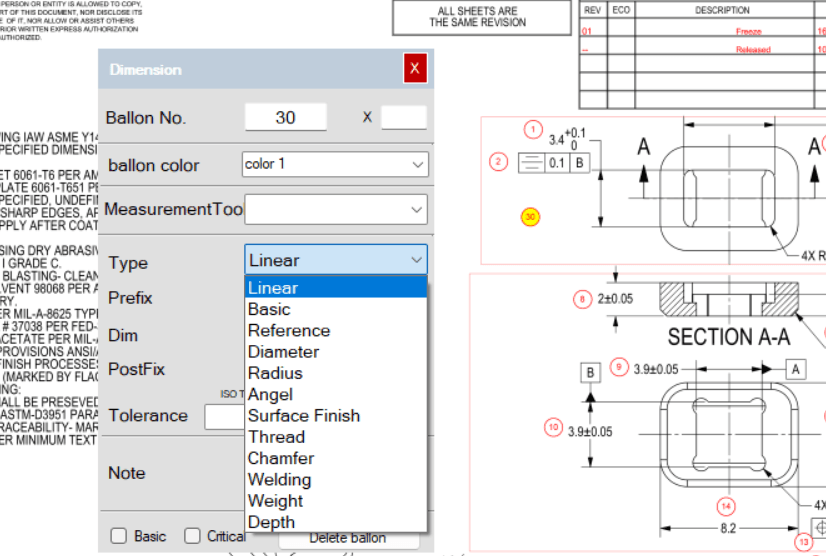
Linear, diameter, radius, angle, chamfer, thread, surface finish, welding symbols, notes and GD&T feature-control frames.
Native and scanned PDF
Works on live vector PDFs and on scanned or photographed drawings using built-in OCR.
Editable balloons
Add, delete or merge requirements; control balloon size, colour, frame and numbering sequence.
Criticality and tooling
Mark basic, critical and key characteristics and assign a measurement tool to every balloon.
Result import
Import CMM (CAMIO, PC-DMIS, DMIS) or scanner results and match them to balloons automatically.
70-90% time saving
Measured on production drawings at leading aerospace and defense customers.
Workflow
Five steps, a few minutes
- 01
Open PDF drawing
- 02
Auto-balloon
- 03
Edit / merge balloons
- 04
Import results
- 05
Generate report
Specifications
PAS PDF at a glance
Formats, standards and systems supported out of the box. Additional machine languages and customer report templates are added on request.
- Drawing input
- Vector PDF, scanned PDF / image with OCR, multi-sheet drawings
- Recognized items
- Linear, Ø, R, angle, chamfer, thread, surface finish, welding, notes, GD&T frames, general tolerance blocks
- Balloon control
- Size, colour, frame shape, sequence, merge / split, key-characteristic marking
- Characteristic data
- Nominal, upper / lower limit, unit, tool, criticality, inspection frequency
- Result import
- CAMIO, PC-DMIS, DMIS, scanner exports, Excel, manual entry
- Output
- Ballooned PDF, characteristic list (Excel), PAS inspection file for PAS Report
In the software
PAS PDF screens
The suite
Works together with
PAS CMM
CMM Programming Automation
From CAD model to a verified CMM program in minutes, not days.
Learn morePAS OM
Optical Metrology Automation
The same automated inspection plan, now for 3D scanners and optical systems.
Learn morePAS Report
FAI, Cpk & Batch Reporting
Inspection results in. Customer-ready FAI, Cpk and batch reports out.
Learn moreSee PAS PDF on your own parts.
Send us a CAD model and a drawing. We will show you the ballooned drawing, the inspection program and the FAI report, generated live.