CMM Programming Automation
From CAD model to a verified CMM program in minutes, not days.
PAS CMM reads the 3D model and its drawing, recognizes every inspection characteristic and generates a complete, collision-checked CMM program in the native language of your machine.
- 90%
- less programming time
- 3,000+
- installed seats
- 1
- inspection model for every machine
The problem
Manual CMM programming is slow, expert-dependent and error-prone. Every drawing is interpreted by hand, every feature is picked one at a time, and each engineering change restarts the cycle.
The PAS way
PAS CMM automates the whole chain: automatic feature recognition on the CAD model, drawing-to-model linking, inspection-plan generation, probe-path planning with collision-free simulation, and output to DMIS, PC-DMIS, CAMIO, COSMOS, Calypso and more. Non-expert users produce production-ready inspection programs in a few clicks.
Capabilities
What PAS CMM does
Automatic feature recognition
Holes, planes, cylinders, cones, slots, profiles and GD&T datums are extracted directly from the CAD model, with nominal values and tolerances.
Drawing-driven inspection plan
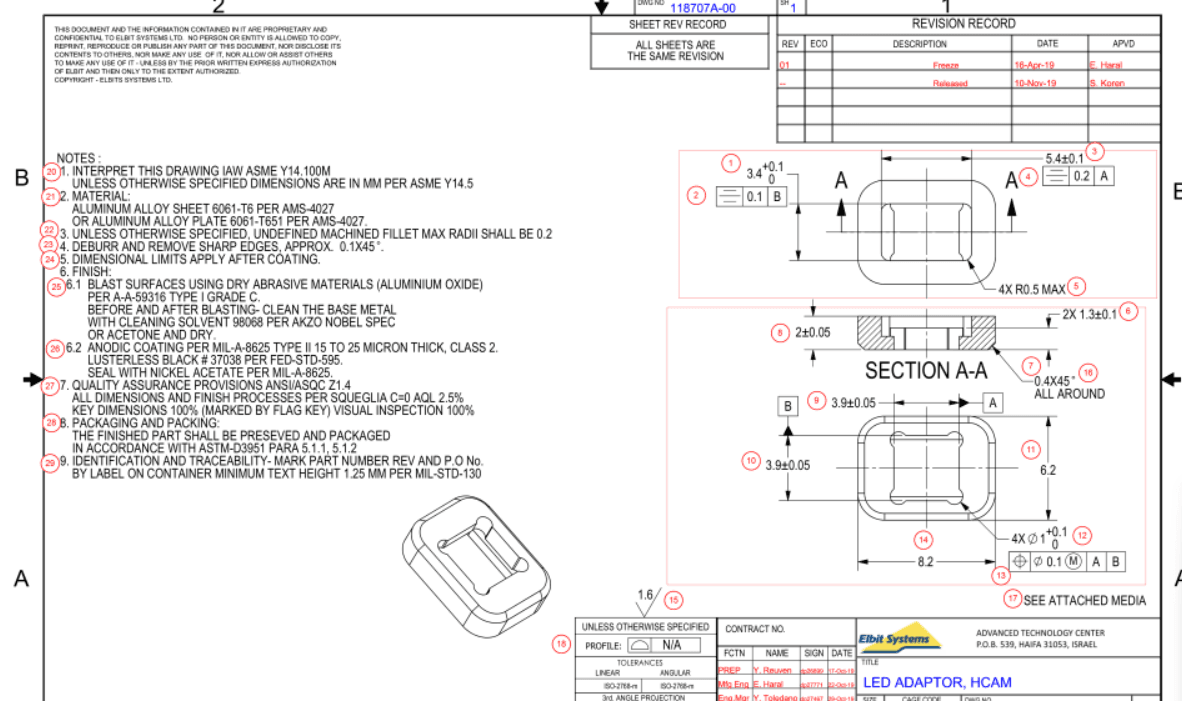
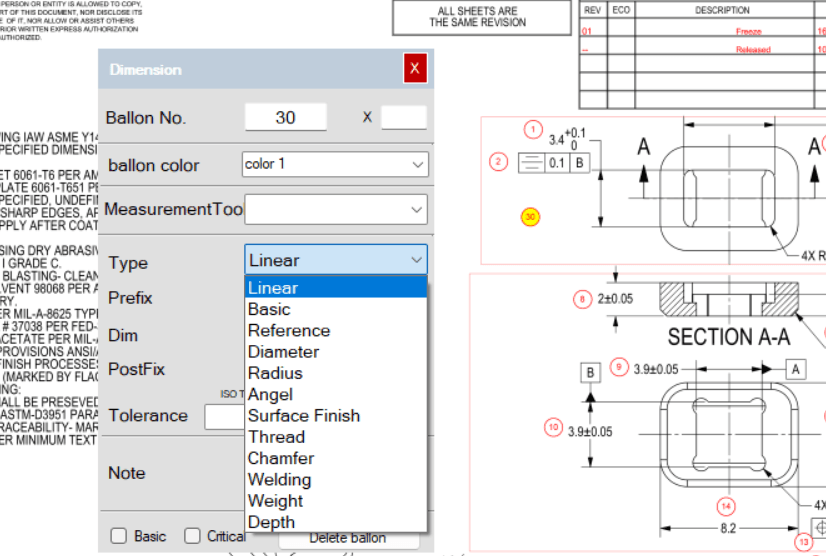
Balloons from the drawing are linked to model geometry, so the program inspects exactly what the drawing requires, in balloon order.
SolidWorks add-in
Open a SLDPRT and SLDDRW pair inside SolidWorks and PAS produces the ballooned drawing and the PAS inspection file automatically.
Virtual machine simulation
Probe paths, stylus changes and clearance moves are generated and verified in a virtual CMM before anything reaches the shop floor.
Engineering change analysis
When the model or drawing changes, PAS highlights what changed and updates only the affected characteristics. No re-programming from scratch.
Multi-machine output
One inspection model, many targets: DMIS, PC-DMIS, CAMIO, COSMOS, Calypso and Renishaw Equator. Move a program between machines without rework.
SolidWorks add-in
SLDPRT + SLDDRW in. Ballooned drawing + inspection plan out.
PAS is a certified SolidWorks Solution Partner. The add-in runs inside SolidWorks: open the part and its drawing, and PAS creates the ballooned drawing, links every balloon to model geometry and writes the PAS inspection file that drives the CMM, the scanner and the report.
- Balloons follow SolidWorks annotation order or your own sequence
- Drawing revision compare inside SolidWorks
- One click from drawing to inspection program
 AUTOMATED
- 01SLDPRT + SLDDRW
- 02Auto-balloon drawing
- 03PAS inspection file
- 04CMM · scanner · report
Renishaw Equator
Program the Equator gauge from the same inspection model.
The Equator flexible gauge is supported as a first-class target. Generate the master and measure routines from the PAS inspection model, and bring results back into PAS Report next to CMM and scanner data.
- Master / measure comparison routines generated automatically
- Same balloon numbers as the CMM program
- Results imported into FAI, Cpk and batch reports
 AUTOMATED
- 01PAS inspection model
- 02Master + measure routines
- 03Equator gauge
- 04PAS Report
Workflow
Five steps, a few minutes
- 01
Import CAD + drawing
- 02
Auto-recognize characteristics
- 03
Review inspection plan
- 04
Simulate and verify
- 05
Export machine program
Specifications
PAS CMM at a glance
Formats, standards and systems supported out of the box. Additional machine languages and customer report templates are added on request.
- CAD input
- SolidWorks, CATIA V5, NX, Creo, STEP AP203/214, IGES, Parasolid
- Drawing input
- SLDDRW (add-in), PDF (vector or scanned) via PAS PDF
- Program output
- DMIS, PC-DMIS, CAMIO, COSMOS, Calypso, Renishaw Equator
- GD&T
- ASME Y14.5 and ISO 1101 frames, datums, MMC/LMC modifiers, ISO 2768 general tolerances
- Simulation
- Virtual CMM with probe configuration, stylus rack and fixture collision check
- Change control
- Model and drawing revision compare with affected-characteristic report
In the software
PAS CMM screens
Demo
PAS CMM in action
A short walkthrough recorded in the software. Full training courses are available to customers in the Training Center.
The suite
Works together with
PAS OM
Optical Metrology Automation
The same automated inspection plan, now for 3D scanners and optical systems.
Learn morePAS PDF
Automatic Drawing Ballooning
Balloon any drawing automatically: native or scanned PDF.
Learn morePAS Report
FAI, Cpk & Batch Reporting
Inspection results in. Customer-ready FAI, Cpk and batch reports out.
Learn moreSee PAS CMM on your own parts.
Send us a CAD model and a drawing. We will show you the ballooned drawing, the inspection program and the FAI report, generated live.